From Landfill to Flight Deck: How We Gave a 24-Year-Old Throttle Quadrant New Life
Flight simulation enthusiasts know the feeling: the satisfying click of a toggle switch, the smooth resistance of a throttle lever, the precise control of a vintage hardware panel. These aren’t just controllers—they’re artifacts from an era when flight simulator hardware was built to last, crafted with real metal, genuine switches, and the kind of mechanical precision you just don’t find in modern plastic peripherals.
The PFC Throttle Quadrant Console is a beast of a controller. Six spring-loaded throttle/prop/mixture controls with smooth, linear potentiometers. A precision rotary trim control. Genuine toggle switches for landing gear and a three-position flaps selector. This is the kind of equipment flight schools used for training—professional grade, built to withstand thousands of hours of use.
But there’s a catch: it uses a DB25 parallel port interface that modern computers simply don’t support. The original driver software is long gone. The company’s support has ended. For most people, this would be the end of the line.
Not for us.
The Mission: USB Conversion Without Compromise
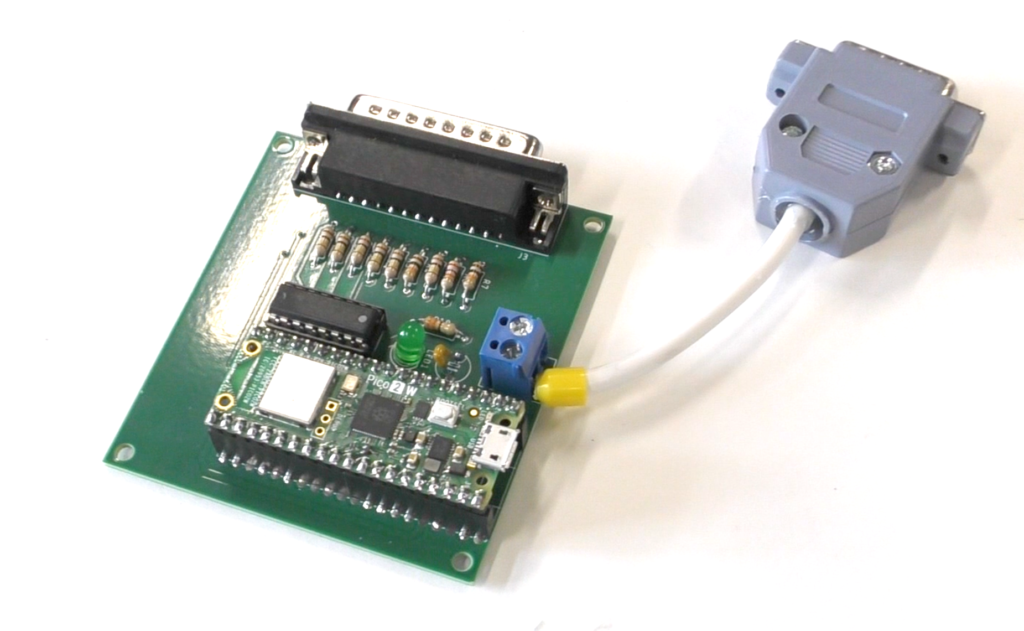
The goal was simple but challenging: convert this vintage hardware to USB HID (Human Interface Device) while preserving every control, every axis, and every switch. No functionality lost. No controls left behind.
Target specifications:
- 7 analog axes (6 throttle/prop/mixture + rudder trim)
- 3 digital buttons (landing gear, flaps up, flaps down)
- Proper calibration for full control range
- Professional device naming
- Plug-and-play compatibility with modern flight simulators
The Journey: Reverse Engineering and Problem Solving
Phase 1: Circuit Archaeology
The first challenge was understanding what we were working with. The DB25 connector on the back of the unit held 25 pins, but which ones actually did something? Armed with a multimeter and patience, I traced every connection:
The Discovery:
- Variable resistor potentiometers (not the typical voltage dividers)
- A clever three-position switch using a 16kΩ resistor for position encoding
- DB25 Pin mapping that required careful documentation
- 100kΩ linear pots and a 25kΩ rotary pot
Phase 2: The ADC Challenge
Here’s where things got interesting. The Raspberry Pi Pico 2 W—our chosen microcontroller—only has three analog input pins (ADC0, ADC1, ADC2). We needed six.
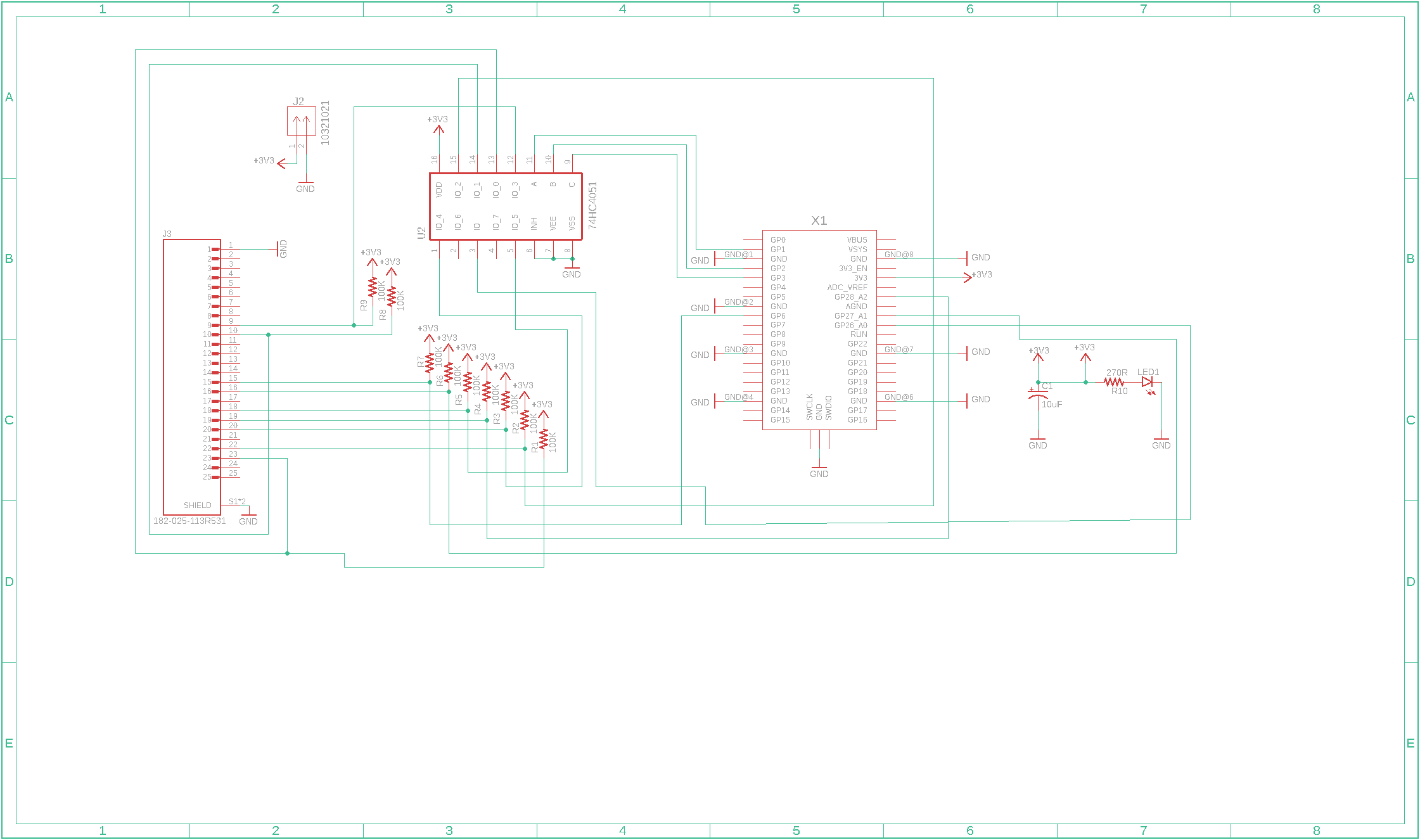
The solution? A 74HC4051 analog multiplexer. This elegant chip allows one ADC pin to read eight different analog inputs by rapidly switching between channels. Perfect for our needs.
Phase 3: Voltage Divider Mathematics
Those 100kΩ potentiometers presented a challenge. With standard 10kΩ pull-up resistors, the voltage divider effect severely limited our range—we’d only see about 30 ADC counts instead of the full 0-1023 range.
The fix: Match the reference resistors to the pot values:
- 100kΩ resistors for the linear pots
- 27kΩ resistor for the rotary pot (we didn’t have a 25kΩ on hand)
This gave us proper voltage swing and full control travel.
Phase 4: The Pin 20/21 Mystery
After all the hardware was wired up, one throttle refused to work. Hours of debugging revealed the culprit: our schematic showed DB25 Pin 20 going to the multiplexer, but the actual hardware used Pin 21 for Throttle 2.
The solution: A simple solder bridge between pins 20 and 21 on the hard-soldered PCB. Sometimes the best solutions are the simplest.
The Hardware Solution
Bill of Materials:
- Raspberry Pi Pico 2 W
- 74HC4051 analog multiplexer
- 6x 100kΩ resistors (for linear pots)
- 1x 27kΩ resistor (for rotary pot)
- DB25 male connector
- DB9 male connector
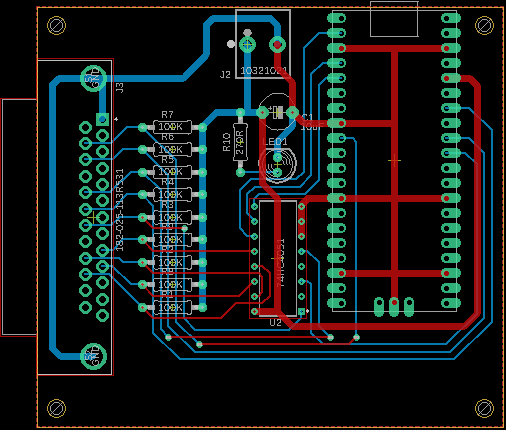
- Custom PCB (design files included in open source release)
Key Features:
- Proper USB device naming: “PFC Rudder Adapter Board”
- 100Hz update rate for responsive control
- 5-sample smoothing for stable readings
- Calibrated axis ranges compensating for hardware limitations
- Complete button support including momentary and three-position switches
The Software: Clean, Documented, Production-Ready
The firmware uses the Adafruit TinyUSB library for proper USB HID implementation. Here’s the complete, production-ready code:
/*
 * PFC Rudder Adapter Board v1.0
 * Precision Flight Controls Throttle Quadrant USB Interface
 *
 * Hardware: Raspberry Pi Pico 2 W with 74HC4051 Analog Multiplexer
 * Purpose: Converts vintage PFC Throttle Quadrant to USB HID Joystick
 *
 * Features:
 * - 7 Analog Axes (6 throttle/prop/mixture + rudder trim)
 * - 3 Digital Buttons (landing gear, flaps up, flaps down)
 * - Smoothed analog readings for stable control
 * - Calibrated ranges for full 0-1023 travel
 *
 * Original Hardware: PFC Throttle Quadrant Console (Build Date 10-1-01)
 * DB25 Interface with variable resistor potentiometers
 *
 * Open Source Hardware Project
 * Designed to rescue vintage flight simulator equipment from landfills
 *
 * Author: Jared Owen (Summit Simulators)
 * License: Open Source
 */

#include "Adafruit_TinyUSB.h"

// ========== USB DEVICE NAMING ==========
#define USB_MANUFACTURER "Precision Flight Controls"
#define USB_PRODUCT "PFC Rudder Adapter Board"
#define USB_SERIAL "PFC-TQ-001"

// ========== PIN DEFINITIONS ==========
#define MUX_OUTPUT_PIN     26   // GP26 - 74HC4051 Z output
#define MUX_A_PIN          1    // GP1 - Multiplexer control A
#define MUX_B_PIN          2    // GP2 - Multiplexer control B
#define MUX_C_PIN          3    // GP3 - Multiplexer control C
#define LANDING_GEAR_PIN   6    // GP6 - Landing gear switch
#define FLAPS_PIN         28    // GP28 - Flaps 3-position switch
#define RUDDER_TRIM_PIN   27    // GP27 - Rudder trim potentiometer

// ========== CALIBRATION VALUES ==========
// Maximum raw ADC values for each potentiometer
// Compensates for voltage divider with 100kΩ/25kΩ pots + 100kΩ/27kΩ resistors
#define T1_MAX 421
#define T2_MAX 430
#define RT_MAX 410
#define P1_MAX 433
#define P2_MAX 440
#define M1_MAX 474
#define M2_MAX 490

// ========== SMOOTHING CONFIGURATION ==========
const int SMOOTH_SAMPLES = 5;
int smoothingBuffers[7][SMOOTH_SAMPLES];
int smoothingIndex = 0;

// ========== FLAPS SWITCH THRESHOLDS ==========
// 3-position switch uses resistor encoding (16kΩ on DOWN position)
const int FLAPS_UP_THRESHOLD = 300;
const int FLAPS_DOWN_THRESHOLD = 700;

// ========== USB HID DESCRIPTOR ==========
// Custom HID report: 3 buttons + 7 analog axes (16-bit, 0-1023 range)
uint8_t const desc_hid_report[] = {
  HID_USAGE_PAGE ( HID_USAGE_PAGE_DESKTOP      ),
  HID_USAGE      ( HID_USAGE_DESKTOP_JOYSTICK  ),
  HID_COLLECTION ( HID_COLLECTION_APPLICATION  ),
    HID_REPORT_ID(1)

    // 3 Buttons
    HID_USAGE_PAGE  ( HID_USAGE_PAGE_BUTTON                  ),
    HID_USAGE_MIN   ( 1                                      ),
    HID_USAGE_MAX   ( 3                                      ),
    HID_LOGICAL_MIN ( 0                                      ),
    HID_LOGICAL_MAX ( 1                                      ),
    HID_REPORT_COUNT( 3                                      ),
    HID_REPORT_SIZE ( 1                                      ),
    HID_INPUT       ( HID_DATA | HID_VARIABLE | HID_ABSOLUTE ),

    // 5 bits padding
    HID_REPORT_COUNT( 5                                      ),
    HID_REPORT_SIZE ( 1                                      ),
    HID_INPUT       ( HID_CONSTANT | HID_VARIABLE | HID_ABSOLUTE ),

    // 7 Analog Axes (16-bit each)
    HID_USAGE_PAGE  ( HID_USAGE_PAGE_DESKTOP                 ),
    HID_USAGE       ( HID_USAGE_DESKTOP_X                    ), // Throttle 1
    HID_USAGE       ( HID_USAGE_DESKTOP_Y                    ), // Throttle 2
    HID_USAGE       ( HID_USAGE_DESKTOP_Z                    ), // Rudder Trim
    HID_USAGE       ( HID_USAGE_DESKTOP_RX                   ), // Prop 1
    HID_USAGE       ( HID_USAGE_DESKTOP_RY                   ), // Prop 2
    HID_USAGE       ( HID_USAGE_DESKTOP_RZ                   ), // Mix 1
    HID_USAGE       ( HID_USAGE_DESKTOP_SLIDER               ), // Mix 2
    HID_LOGICAL_MIN_N ( 0, 2                                 ),
    HID_LOGICAL_MAX_N ( 1023, 2                              ),
    HID_REPORT_COUNT( 7                                      ),
    HID_REPORT_SIZE ( 16                                     ),
    HID_INPUT       ( HID_DATA | HID_VARIABLE | HID_ABSOLUTE ),

  HID_COLLECTION_END
};

// HID report structure
struct {
  uint8_t buttons;      // 3 buttons + 5 padding bits
  uint16_t x;          // Throttle 1
  uint16_t y;          // Throttle 2
  uint16_t z;          // Rudder Trim
  uint16_t rx;         // Prop 1
  uint16_t ry;         // Prop 2
  uint16_t rz;         // Mix 1
  uint16_t slider;     // Mix 2
} __attribute__((packed)) hid_report;

Adafruit_USBD_HID usb_hid;

// ========== SETUP ==========
void setup() {
  Serial.begin(115200);

  // Set USB device descriptors
  TinyUSBDevice.setManufacturerDescriptor(USB_MANUFACTURER);
  TinyUSBDevice.setProductDescriptor(USB_PRODUCT);
  TinyUSBDevice.setSerialDescriptor(USB_SERIAL);

  // Setup USB HID
  usb_hid.setPollInterval(2);
  usb_hid.setReportDescriptor(desc_hid_report, sizeof(desc_hid_report));
  usb_hid.setStringDescriptor("PFC Throttle Quadrant");
  usb_hid.begin();

  // Configure pins
  pinMode(LANDING_GEAR_PIN, INPUT_PULLUP);
  pinMode(MUX_A_PIN, OUTPUT);
  pinMode(MUX_B_PIN, OUTPUT);
  pinMode(MUX_C_PIN, OUTPUT);

  // Initialize smoothing buffers
  for (int i = 0; i < 7; i++) {
    for (int j = 0; j < SMOOTH_SAMPLES; j++) {
      smoothingBuffers[i][j] = 512;
    }
  }

  // Initialize HID report
  memset(&hid_report, 0, sizeof(hid_report));
  hid_report.x = 512;
  hid_report.y = 512;
  hid_report.z = 512;
  hid_report.rx = 512;
  hid_report.ry = 512;
  hid_report.rz = 512;
  hid_report.slider = 512;

  // Wait for USB enumeration
  while (!TinyUSBDevice.mounted()) delay(1);

  delay(1000);
  Serial.println("==========================================");
  Serial.println("PFC Rudder Adapter Board v1.0");
  Serial.println("Precision Flight Controls USB Interface");
  Serial.println("==========================================");
  Serial.print("USB Device: ");
  Serial.println(USB_PRODUCT);
  Serial.println("==========================================");
  Serial.println("Controls:");
  Serial.println("  X-axis: Throttle 1");
  Serial.println("  Y-axis: Throttle 2");
  Serial.println("  Z-axis: Rudder Trim");
  Serial.println("  Rx-axis: Prop 1");
  Serial.println("  Ry-axis: Prop 2");
  Serial.println("  Rz-axis: Mix 1");
  Serial.println("  Slider: Mix 2");
  Serial.println("  Button 1: Landing Gear");
  Serial.println("  Button 2: Flaps Down");
  Serial.println("  Button 3: Flaps Up");
  Serial.println("==========================================");
  Serial.println("Hardware: Pi Pico 2 W + 74HC4051 MUX");
  Serial.println("Open Source Hardware Project");
  Serial.println("==========================================");
  Serial.println();
}

// ========== MULTIPLEXER CHANNEL READING ==========
int readMuxChannel(int channel) {
  // Set 3-bit channel address
  digitalWrite(MUX_A_PIN, channel & 0x01);
  digitalWrite(MUX_B_PIN, (channel >> 1) & 0x01);
  digitalWrite(MUX_C_PIN, (channel >> 2) & 0x01);

  delayMicroseconds(50); // Allow multiplexer to settle
  return analogRead(MUX_OUTPUT_PIN);
}

// ========== ANALOG SMOOTHING ==========
int smoothAnalogRead(int rawValue, int bufferIndex) {
  // Store new reading in circular buffer
  smoothingBuffers[bufferIndex][smoothingIndex] = rawValue;

  // Calculate rolling average
  long sum = 0;
  for (int i = 0; i < SMOOTH_SAMPLES; i++) {
    sum += smoothingBuffers[bufferIndex][i];
  }

  return sum / SMOOTH_SAMPLES;
}

// ========== CALIBRATION AND INVERSION ==========
// Maps raw ADC values to full 0-1023 joystick range
// Also inverts (pots read backwards - high value at minimum position)
uint16_t mapToJoystick(int rawValue, int maxValue) {
  if (rawValue < 0) rawValue = 0;
  if (rawValue > maxValue) rawValue = maxValue;

  // Invert: 0→1023, maxValue→0
  return map(rawValue, 0, maxValue, 1023, 0);
}

// ========== FLAPS SWITCH DETECTION ==========
// Decodes 3-position switch using analog voltage levels
// UP=0V, DOWN=voltage divider with 16kΩ, CENTER=pull-up voltage
int readFlapsSwitch() {
  int rawValue = analogRead(FLAPS_PIN);

  if (rawValue < FLAPS_UP_THRESHOLD) return 0;       // UP
  else if (rawValue > FLAPS_DOWN_THRESHOLD) return 2; // CENTER
  else return 1;                                      // DOWN
}

// ========== MAIN LOOP ==========
void loop() {
  static unsigned long lastUpdateTime = 0;
  unsigned long now = millis();

  // Read all multiplexed channels (verified hardware mapping)
  int m2_raw = readMuxChannel(0);  // Ch0: Mix 2
  int m1_raw = readMuxChannel(1);  // Ch1: Mix 1
  int p2_raw = readMuxChannel(2);  // Ch2: Prop 2
  int p1_raw = readMuxChannel(3);  // Ch3: Prop 1
  int t2_raw = readMuxChannel(4);  // Ch4: Throttle 2
  int t1_raw = readMuxChannel(5);  // Ch5: Throttle 1

  // Read direct analog connections
  int rt_raw = analogRead(RUDDER_TRIM_PIN);

  // Read digital inputs
  bool landingGear = !digitalRead(LANDING_GEAR_PIN);
  int flapsPosition = readFlapsSwitch();

  // Apply smoothing
  int t1 = smoothAnalogRead(t1_raw, 0);
  int t2 = smoothAnalogRead(t2_raw, 1);
  int rt = smoothAnalogRead(rt_raw, 2);
  int p1 = smoothAnalogRead(p1_raw, 3);
  int p2 = smoothAnalogRead(p2_raw, 4);
  int m1 = smoothAnalogRead(m1_raw, 5);
  int m2 = smoothAnalogRead(m2_raw, 6);

  smoothingIndex = (smoothingIndex + 1) % SMOOTH_SAMPLES;

  // Map to HID ranges (calibrated and inverted)
  hid_report.x = mapToJoystick(t1, T1_MAX);       // Throttle 1
  hid_report.y = mapToJoystick(t2, T2_MAX);       // Throttle 2
  hid_report.z = mapToJoystick(rt, RT_MAX);       // Rudder Trim
  hid_report.rx = mapToJoystick(p1, P1_MAX);      // Prop 1
  hid_report.ry = mapToJoystick(p2, P2_MAX);      // Prop 2
  hid_report.rz = mapToJoystick(m1, M1_MAX);      // Mix 1
  hid_report.slider = mapToJoystick(m2, M2_MAX);  // Mix 2

  // Set button states
  hid_report.buttons = 0;
  if (landingGear) hid_report.buttons |= 0x01;        // Button 1: Landing Gear
  if (flapsPosition == 1) hid_report.buttons |= 0x02; // Button 2: Flaps DOWN
  if (flapsPosition == 0) hid_report.buttons |= 0x04; // Button 3: Flaps UP

  // Send HID report at 100Hz (10ms intervals)
  if (TinyUSBDevice.mounted() && (now - lastUpdateTime >= 10)) {
    usb_hid.sendReport(1, &hid_report, sizeof(hid_report));
    lastUpdateTime = now;
  }

  delay(1);
}
Why This Matters: The Case for Vintage Hardware Preservation
Environmental Impact: Every piece of functional equipment we rescue from landfills is one less contribution to e-waste. This throttle quadrant was built to last decades—throwing it away because of a connector mismatch is wasteful.
Superior Build Quality: Modern budget flight sim hardware is often plastic, lightweight, and designed for a few years of use. Vintage professional equipment like this PFC unit features:
- Metal construction
- Precision potentiometers
- Genuine toggle switches
- Spring-loaded controls with authentic feel
- Build quality designed for flight training environments
Authentic Flight Experience: There’s something intangible about using real, professional-grade hardware. The weight, the resistance, the tactile feedback—these aren’t just controllers, they’re training tools that were designed to replicate the feel of actual aircraft controls.
Preserving History: Companies like Precision Flight Controls pioneered consumer flight simulation hardware. These devices represent an important part of simulation history and deserve preservation.
100% Open Source: Everything You Need
This isn’t just a blog post—it’s a complete open-source hardware project. I’m releasing everything needed to build your own PFC Rudder Adapter Board, completely free:
Flight Simulator Compatibility
The PFC Rudder Adapter Board works as a standard USB HID joystick with:
- Microsoft Flight Simulator 2020/2024
- X-Plane 11/12
- DCS World
- IL-2 Sturmovik
- Any simulator supporting standard USB joysticks
Recommended Axis Assignments:
- X-axis → Engine 1 Throttle
- Y-axis → Engine 2 Throttle
- Rx-axis → Engine 1 Propeller
- Ry-axis → Engine 2 Propeller
- Rz-axis → Engine 1 Mixture
- Slider → Engine 2 Mixture
- Z-axis → Rudder Trim
- Button 1 → Landing Gear
- Button 2/3 → Flaps Control
Build Your Own: Getting Started
Difficulty Level: Intermediate (soldering required, basic electronics knowledge helpful)
Estimated Build Time: 4-6 hours
Estimated Cost: $15-25 USD (depending on component sourcing)
Required Tools:
- Soldering iron
- Multimeter
- Wire strippers
- Basic hand tools
Optional but Recommended:
- 3D printer (for case) or order prints from online service
- PCB manufacturing service (JLCPCB, PCBWay, etc.)
- Heat shrink tubing
- Label maker
Join the Movement: Build, Share, Improve
This project represents more than just one saved throttle quadrant. It’s a template for rescuing vintage flight simulator hardware of all kinds:
How You Can Help:
- Build your own – Use these plans to rescue your own vintage hardware
- Share your build – Document your results and help others
- Improve the design – Submit pull requests with enhancements
- Spread the word – Share this with flight sim communities
- Rescue hardware – Check eBay, estate sales, and surplus stores for vintage equipment
Technical Details for the Curious
Why Pi Pico 2 W?
- Affordable ($6)
- Built-in USB HID support
- Sufficient ADC resolution (12-bit)
- Active development community
- Over-spec’d for this application (leaves room for expansion)
Why the 74HC4051 Multiplexer?
- Industry-standard component
- Low on-resistance
- Simple three-wire addressing
- Inexpensive (~$0.50)
- Proven reliability
1 – 100k
2 – 100k
3 – 100k
4 – 10k
5 – 100k
6 25k
7 10k
8 – 100k
9 – 100k
10 – 270
Calibration Philosophy: Rather than try to modify the hardware, we calibrate in software. Each potentiometer has a different maximum value due to the voltage divider effect, so we map those actual ranges to the full 0-1023 HID range. This gives perfect full-travel control in simulators while preserving the original hardware.
Conclusion: Keep Them Flying
Every piece of vintage hardware we save is a victory against planned obsolescence. These devices were built when flight simulation hardware was treated as serious equipment, not disposable toys.
The PFC Throttle Quadrant Console I rescued represents countless hours of engineering, manufacturing precision, and built-in durability. It deserved better than a landfill, and now it has a second life bringing authentic flight experiences to modern simulators.
If you have vintage flight sim hardware collecting dust, don’t throw it away. With some electronics knowledge, patience, and the resources provided in this project, you can give it new life.
The sky’s the limit—literally.
Resources
Case Lid
https://angryzeppelin.com/attachments/throttle-board-box-TOP.stl
Case Bottom
https://angryzeppelin.com/attachments/throttle-board-box.stl
Gerber Files
https://angryzeppelin.com/attachments/GERBER_WITH_SILKSCREEN.zip
Board File
https://angryzeppelin.com/attachments/RaspberryPi_Pico2_DB25.brd
Circuit File
https://angryzeppelin.com/attachments/RaspberryPi_Pico2_DB25.sch
Parts Suppliers:
- Raspberry Pi Pico 2 W: [Adafruit, Sparkfun, Pimoroni]
- 74HC4051: [Mouser, Digikey, LCSC]
- PCB Manufacturing: [JLCPCB, PCBWay, OSH Park]
This project is released under [Choose: MIT/GPL/CC-BY-SA] license. Build it, modify it, share it, sell it—just keep the hardware flying.
Special thanks to the flight simulation community for decades of hardware preservation efforts, and to everyone who chooses repair over replacement.
#VintageHardware #FlightSim #OpenSource #RightToRepair #PiPico #HardwareHacking